



From “We Should Fix This” to Actual Code: Building a Meeting-to-Execution Pipeline
Most AI tools just summarize meetings. By the end of this post, you'll know how to build a real-time intelligence pipeline that prepares execution-ready context from raw audio.


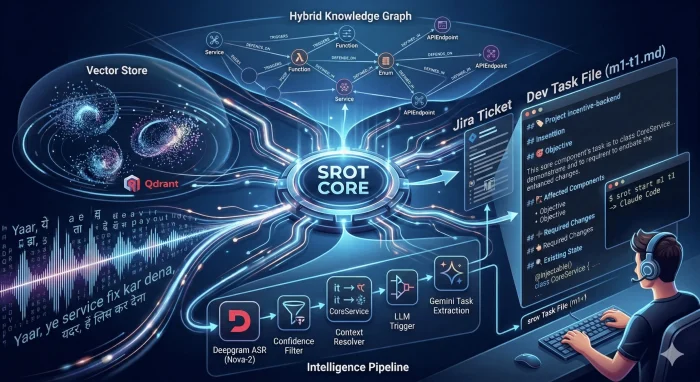
📂 Explore the Source
If you want to dive straight into the implementation, you can explore the repositories below:
- Srot Core (github.com/pathak404/srot-core): The central intelligence pipeline, FastAPI backend, and Knowledge Graph (Neo4j/Qdrant) logic.
- Srot CLI (github.com/pathak404/srot-cli): The developer tool for execution, providing the
srot startcommand to link meetings directly to Claude Code.
The Problem with Meetings
In my current company, meetings with the Product team usually run long. Since we only do it once or twice a month, we end up discussing tasks for several different modules all at once. Each task comes with its own set of conditions, priorities, and deadlines. By the time the meeting ends, I have forgotten most of the specific conditions. Usually, Jira tickets arrive after development has started. Even if we don't get them, we need to create them manually, and of course they are incomplete. Later, we have to apply extra effort to refactor it if the implementation is done based on assumptions.
What I Wanted to Build
I wanted an intelligence system that could listen to office meetings and transcribe them. But I didn't just want a summary. I wanted something that suggests Jira tickets and creates complete, task-specific prompts that a developer can hand over to an AI agent to execute.
Where Things Started Breaking
At first, It looked simple. Transcribe the meeting then Send it to an LLM then Generate tasks but when I started building it, everything started breaking.
1. Transcription Alone Fails
Suppose we are in the middle of the meeting and someone saying:
"guys we should fix it by Friday, it’s failing sometimes"
This is ambiguous, incomplete, not actionable. Feeding this directly to an LLM produces generic output or even hallucinations. The problem is not transcription. The problem is extracting meaning.
Also this is not usable. What needs fixing? Which service? Raw transcripts are noise.
2. Sentences Don't Mean Anything Alone
If we process line by line then we will loose context, for example:
"payout service is failing"
"we should fix it"
The second sentence is meaningless without the first.
3. Context keeps changing
Meeting topics jump around. We might discuss Payouts, then Schemes, then Partner Notifications, then suddenly say, "Fix it."
What is the meaning of "it" in "fix it" ?
Without context we will get wrong tasks and vague output.
4. LLMs Over-Generate
Meetings can last more than six hours so sending the complete transcript is the worst thing. Token usage spikes, It will give too many tasks, irrelevant outputs and hallucinations. so LLMs need control.
5. No Code Context & Execution Gap
Even correct tasks were incomplete.
"Fix payout logic"
The line is still unclear. Where? How? Even after tasks, I still had to think break things down and explore code. The system wasn't solving the full problem.
How Srot Understands Your Codebase
Most AI tools treat meeting transcripts like a creative writing prompt. But for developers, context is everything. When you mention a "mobile API update," you aren't just saying words; you're talking about a specific web of services and dependencies. Srot uses a hybrid Knowledge Graph and Vector Search system to ensure the AI is looking at your actual database schema and code structure instead of guessing.
I built this to bridge the gap between messy conversation and the technical reality of a TypeScript and NestJS environment.
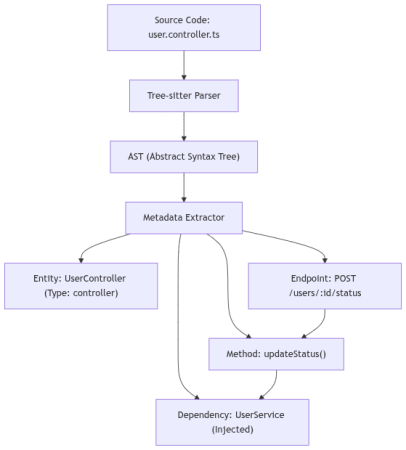
1. Structured Code Parsing
I used Tree-sitter to walk through the codebase because regex just doesn't cut it. Unlike simple pattern matching, Tree-sitter builds a full Abstract Syntax Tree (AST). This allows Srot to identify exactly what a class is by its decorators, knowing the difference between a generic class and a NestJS @Controller or @Injectable service. It crawls the .ts files, peeks into constructors for Dependency Injection, and maps out TypeORM entities to understand your data schema.
How it works:
- Scanner: The indexer crawls every
.tsand.tsxfile in your project. - AST Traversal: We look for specific NestJS patterns:
- Decorators:
@Injectable()tags a class as aService.@Controller()marks it as anAPI Gateway. - Dependency Injection: We peek into the
constructor()to see which other services are being injected. - TypeORM/GraphQL: We extract
@Columnand@Fielddefinitions to map your data schema.
- Decorators:
- Entity Decomposition: Every function, class, and enum is broken down into a "Source Chunk" (the actual code snippet that defines it) along with its metadata such as params, return types, and file paths.
Example: From Code to Metadata
Source Code (user.controller.ts):
@Controller('users')
export class UserController {
  constructor(private userService: UserService) {}

  @Post(':id/status')
  updateStatus(@Param('id') id: string) {
    return this.userService.setStatus(id, 'active');
  }
}
2. Building the Knowledge Graph
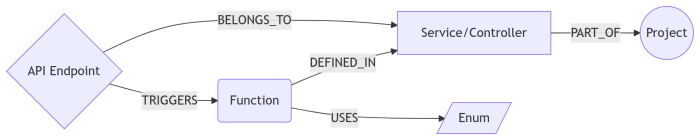
Once parsed, everything goes into Neo4j. I like to say that while vector search is great for "vibes," a graph is required for "truth." It maps the rigid structure of your app:
- Nodes: Represents Projects, Services, Functions, and API Endpoints. I even added Domain Entities to bridge the gap between "Business Talk" (e.g., Payouts) and "Code Reality" (
PayoutService). - Edges: These define the logic flow-
TRIGGERS,CALLS, andDEPENDS_ON. IfPayoutServicedepends onBankClient, Srot knows it. - Importance: We calculate a
usage_weightso the system knows that a heavily injectedAuthServiceis mathematically more "important" than a random utility file.
3. Multi-Vector Search
Structure isn't enough on its own. If a developer says "the payment process," they are speaking in concepts, not variable names. They might mean the TransactionService. To bridge this gap, I used Qdrant with a multi-vector approach.
I use a Name Vector (384-dim) for identity and a Semantic Vector (768-dim) for intent. This lets the system understand both the literal name of the code and the logic behind it. All projects share one collection, but I use Metadata Filters to ensure that "User" entities from the Billing project never leak into the Auth project.
Metadata Isolation at Scale:
To keep lookups fast, all projects share a single Qdrant collection (codebase_entities). We achieve high-fidelity isolation using Metadata Filters. Every query is hard-scoped to the current project_name, ensuring that a "User" entity in the Billing project never leaks into the Auth project.
4. The Hybrid Scoring Algorithm
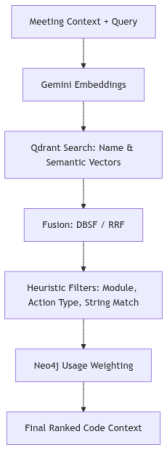
While a meeting is in progress, Srot isn't just doing a simple search. It’s running a three-stage ranking pipeline to make sure the code context it finds is actually relevant. I built this to act as a final filter, ensuring that the system doesn't just grab any service with a similar name, but finds the one that actually fits the conversation.
Stage 1: Vector Fusion
We start by running multiple types of vector searches in parallel.
One captures meaning (semantic embeddings), another captures naming patterns (like PayoutService, BankTransfer), and sometimes even exact string matches.
Now here’s the important part, we don’t pick one winner.
We combine all results using a technique called Distribution-Based Score Fusion (DBSF), which basically normalizes and merges scores so no single method dominates unfairly.
For example -
“failed bank transfers”
- Semantic search: finds transaction failures
- Name-based search: finds
BankTransferService - String match: finds exact mentions of “bank transfer”
Individually, each is incomplete.
Together, they start forming a real picture.
Stage 2: Heuristic Refinement
We apply "Hard" engineering context:
- Module Affinity: If the discussion is about billing, there’s a high chance the relevant code lives in:
src/billing/So we boost entities from that module. - Action Type Compatibility: If the task is to "add a field," we prioritize
EntityColumnnodes.
Stage 3: The Final Score Formula
At the end, every candidate gets a final score based on multiple signals:
Example: Resolving a Meeting Query
"We need to fix the logic for failed bank transfers."
| Candidate Symbol | Semantic | Name Match | Graph Weight | Final Score |
|---|---|---|---|---|
TransferService.handleFailure | 0.95 | 0.88 | 0.50 | 0.91 (Winner) |
BankTransferEntity | 0.70 | 0.90 | 0.30 | 0.72 |
FailureRetryWorker | 0.60 | 0.10 | 0.20 | 0.45 |
5. Why This Matters
Combining the Graph with Vectors gives Srot "Grounded Intelligence." When you say "update the interest rate" in a meeting, Srot doesn't just create a vague Jira item. It finds the InterestService, identifies the RateEnum, and pulls the exact code chunk for the LLM. You get an AI that actually understands your work.
Building the Intelligence Pipeline
Instead of one LLM call, I built a pipeline the solves each failure point.
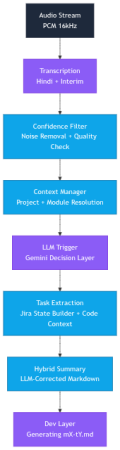
1. Audio Streaming
Before any intelligence, the system needs a continuous stream of audio. I take input from the microphone, convert the raw Float32 frames into PCM16, chunk them into small buffers, and send them via WebSockets to the server.
I initially tried 5 or 6 open-source ASRs for this, but most had high latency or poor accuracy. I eventually switched to Deepgram because accuracy and cost matter when you're moving fast.
2. Transcription Layer
Meetings are messy. People interrupt each other, switch languages mid-sentence, and speak casually. The transcription system doesn't 'understand' intent; it simply predicts the most likely sequence of words.
So instead of clean sentences, i often get semi-broken text that looks correct but carries hidden errors. For example -
Speaker A: "Bhai payout service mein issue aa raha hai"
Transcription: "Bhai payout service mein issue aa raha hai"
Looks fine, but sometimes: "Bhai pay out servish mein issue aa raha hai"
This causes downstream systems to break.
To fix this, I built a Confidence Analyser. As Deepgram processes audio, it returns a probability score for every word. I calculate a Chunk Confidence for every 15-second segment:
I categorize each chunk into one of three qualitative tiers-
- HIGH (Score >= 0.90): These segments are prioritised for extracting action items and core decisions.
- MEDIUM (0.75 <= Score < 0.90): Generally reliable, but might contain minor errors, slight background noise, or "um/uh" filler words that lower the average.
- LOW (Score < 0.75): Flagged as "noisy" data. The system might treat these with lower priority to prevent hallucinations in the tasks and final meeting summary.
3. Noise Removal & Quality check
A massive portion of the transcript is technically "noise". Including greetings, audio checks, filler words, and social niceties. Processing this raw data is a waste of API tokens and increases hallucination risk because the LLM tries to find "tasks" in sentences like "Can everyone see my screen?".
The tricky part is Short ≠ useless
Input: “Hello guys, can you hear me?”
Output: Dropped
Input: “Fix the login bug”
Output: Kept
“Fix it” is extremely important despite being tiny.
How i solve it
Initially, i used a regex-powered gate but later switched to hybrid approach because i know that the regex alone cannot cover all the scenarios, so i added a final validation via Gemini Flash Lite LLM.
I first run the transcript through a regex engine looking for intent keywords. If the chunk contains actionable verbs like fix, update , add , or remove it is immediately flagged for retention. Since our team speaks Hinglish, i also include patterns for phrases like bana dena or dekh lena.
Then, for ambiguous cases, Gemini does a final validation before any chunk is officially dropped.
This reduces noise by 40% to 60% before the expensive extraction phase begins.
4. Context Manager & Resolver
I believe one of the biggest hurdles in AI transcription is pronoun resolution. In meetings, people rarely repeat full technical names, they rely on context. For an AI processing short audio chunks, terms like it, this, or that are often meaningless.
For example -
"Let’s fix it by Monday."
"We should move this feature to the next sprint."
"Does that bug affect the payout service?"
Without context, the LLM either guesses or fails to extract a task.
Context Manager: This acts as the pipeline’s brain, keeping a live state of the conversation. As the audio flows, it updates a MeetingContext object by:
- Tracking Entities: It uses regex and heuristic filters to spot capitalized terms or quoted strings that sound like code.
- Detecting Topics: It watches a "sliding window" of the conversation. If "Payment Gateway" keeps coming up, it promotes that to the
current_topic. - Persistence: When a technical symbol is identified, it’s cached as the
active_issueso the system knows exactly what we’re focusing on right now.
Context Resolver: It is the bridge between the raw transcript and the LLM. Before any text is sent for task extraction, the Resolver performs a "Search and Replace" based on what the Manager currently knows.
Example Transformation-
Speaker A: "We have a bug in the Subscription feature."
Speaker B: "Okay, let's fix it."
Context Snapshot: {"active_issue": "Subscription feature", "current_topic": "Billing"}
Resolved Text: "Okay, let's fix Subscription feature"
By performing this surgical swap, the ambiguity is gone before the LLM even sees the text. It makes the final output much more reliable.
5. LLM Trigger
Even after removing the noise, calling a heavy LLM for every single sentence is expensive and slow. Most of a meeting is just discussion, not necessarily a new task. The LLM Trigger acts as a final "Binary Gate" to decide if a chunk of text is worthy of our high-intelligence processing pipeline.
But wait, why do i need this?
If a developer says,
"The payout logic is currently using a 2% margin"
that is a clean, useful sentence, but it isn't an instruction. We don't need to trigger the full Task Extraction logic for a simple statement of fact. I only want to spend our "AI credits" when a decision is made or a task is assigned.
How it works
I use a two-path validation system to keep latency low:
- The Fast Path: If our earlier regex layer detected high-intent keywords like
fix,update,add, orremoveit the gate opens automatically. - The Smart Path: For ambiguous cases where intent is unclear, i send the chunk to Gemini 2.5 Flash Lite. This lightning-fast model answers a single binary question: "Is this an engineering decision? YES/NO".
By implementing this gate, i filter out nearly 80% of the clean transcript, sending only the high-signal "action items" to the extraction layer. This keeps the system extremely responsive and ensures that the final Jira tickets are only created for actual work, not just random technical chatter.
6. Jira Task Extraction
This is where the heavy lifting happens. Once i have a clean, context-rich transcript, i send it to our main LLM to extract a structured title, a technical description, and affected components.
The Logic Behind It
- Input: "Update logic in PayoutService to handle multi-currency."
- Output: A JSON object with fields mapped directly to Jira, including titles and assignee suggestions.
But wait, why do we need this?
A major challenge with LLMs is hallucination. If a speaker is vague, the LLM might "hallucinate" a service name like PayoutSvc that doesn't actually exist in your repository. If a task is created for a non-existent component, the bridge between the meeting and the code breaks.
The Technical Fix using Graph & Vector Grounding
To ensure 100% accuracy, I implemented a Grounding Layer (see The Hybrid Scoring Algorithm part) that acts as a technical truth-checker before the ticket is finalized:
- Before extraction, we inject a "Catalog" of real symbols, class names, decorators like
@Injectable(), and API routes pulled directly from our Neo4j Knowledge Graph. - If the LLM produces a symbol that doesn't perfectly match the graph, the system performs a Vector Similarity lookup in Qdrant. It compares the "hallucinated" name against the actual Name Vectors (384d) of the codebase.
- If
PayoutSvcis suggested, the system identifies thatPayoutServicehas the highest mathematical similarity and auto-corrects the ticket.
I also built a Jira State Builder that uses-
- Fuzzy String Matching: calculates the token overlap percentage between a newly extracted task and existing tickets.
- The 70% Rule: If a new task title has more than a 70% overlap with an existing ticket, the system merges them, updating the existing description with the fresh context instead of creating a duplicate.
7. Dual Summarization
In long sessions, the transcript grows too massive for the LLM to process every time without hitting token limits or increasing costs.
To handle this issue, I split the workload:
- Live Summarizer (Long Term) : It builds an incremental Markdown report, waits for eight conversation chunks to accumulate before calling Gemini to update the summary.
- Periodic Compressor (Short Term) : This acts as the background "Archivist". Every five minutes of audio, this layer "squashes" the raw history into 3 to 5 potent sentences. It uses
gemini-2.5-flash-liteto turn pages of raw text into a high-density JSON summary.
This dual approach ensures the LLM retains a powerful context of the meeting without getting buried under raw data.
8. Dev Layer
To hit my final goal, I added this layer at the very end of the pipeline. It produces a structured Markdown file (something like m1-t1.md) that acts as the final bridge between the meeting discussion and the actual code implementation.
Making Tasks "Execution Ready"
Standard Jira tickets are usually too vague for an AI agent or a engineer to start on immediately. To fix this, I use a strict engineering template that enriches every task with real context from the codebase:
- Existing State: Instead of a summary, the system pulls actual code snippets and logic directly from the graph and vector databases to show how things are currently implemented.
- Execution Hints: It provides specific guidance on where to start looking and which files are likely to be affected by the change.
- Grounded Context: By including relative file paths and actual service names, this file becomes the perfect hand-off for tools like Claude Code.
The Module Logic
This isn't just a summary, it’s a generated artifact built by the Jira State Builder and the Dev Task Generator. It takes the extracted task and merges it with the hybrid knowledge retrieved from Neo4j and Qdrant.
The result is a workflow where I can just use the Srot CLI and run srot start m1 t1. This command automatically resolves the project path, loads that grounded context, and hands everything off to an AI coding agent. It effectively kills the "research and setup" phase of development.
What’s Next?
This is just the beginning for Srot. I’m looking into:
- Fine-Tuning the Grounding: Even with multi-repo support, I want to make the cross-service relationship mapping even sharper so the AI can trace a bug through three different repos without breaking a sweat.
- Shaving off Latency: I’m working on refining the "Smart Path" in the LLM Trigger to make the pipeline even faster.
- Better Integration: I'm working on refining the "Smart Path" in the LLM Trigger to make the pipeline even faster.
I’d love to hear your thoughts on this approach. Are you using Knowledge Graphs in your AI workflows? Or do you have a different way of solving the "context gap" in your meetings?
Check out the code, and feel free to open a PR:
Related Articles

Quick Links
Company
Contact Us






TENB Fintech Private Limited, CIN: U62099HR2023PTC114628, Registered Office: 4th Floor, Rider House, Plot No. 136-P, Sector-44, Gurugram - 122003, Haryana, Tel No - +91-8058058009, Email ID: info@ambak.com
Copyright © 2026 TENB FINTECH PRIVATE LIMITED All rights reserved